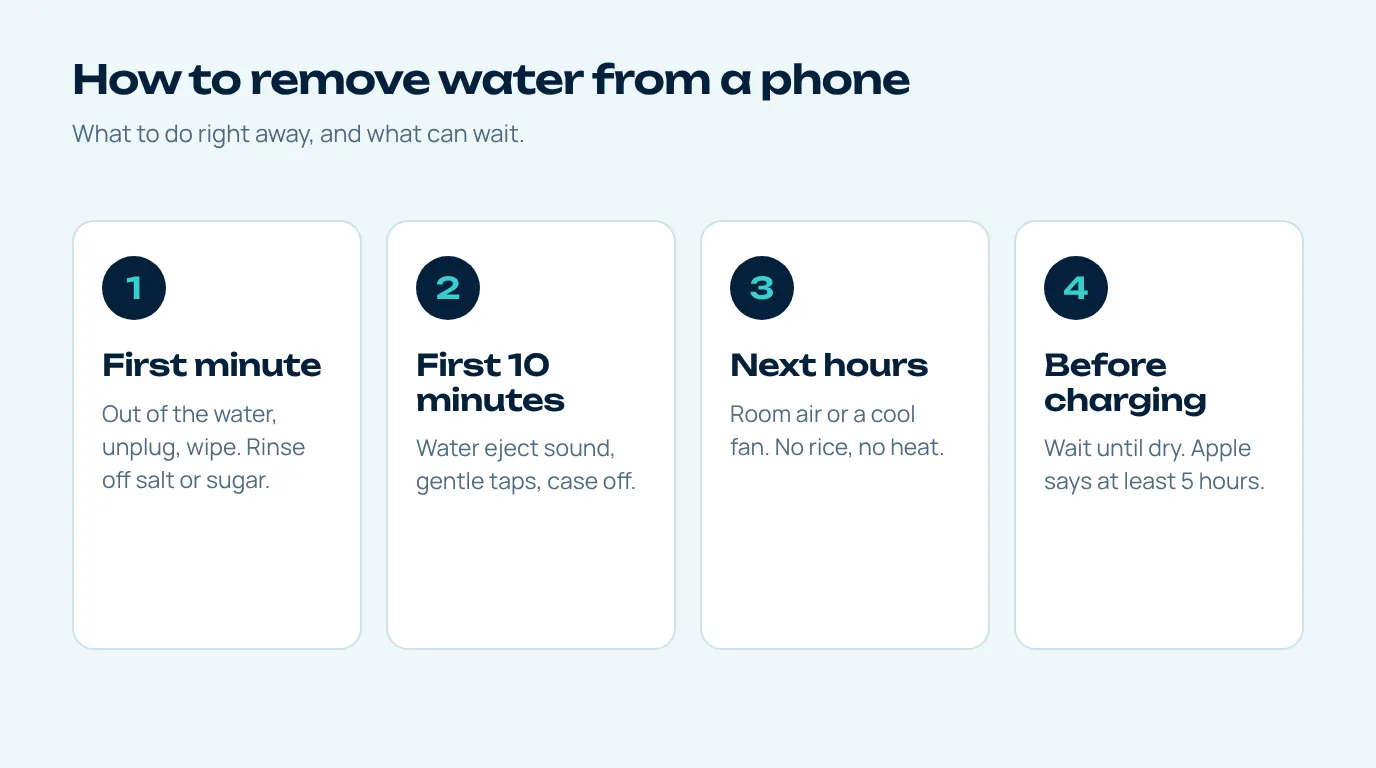
Get it out, unplug it, wipe it and pull the case off. Then play our free water eject sound with the speaker pointing down to remove water from phone speakers, give it a few gentle taps with the charging port facing the floor, and leave it somewhere with moving air. Don't plug a cable in until it's dry, and don't bother with rice or a hair dryer.
How worried you should be really comes down to three things: how long it was in there, what it was in, and how water resistant your phone is to begin with. A two-second dunk in clean water is a very different story from half an hour at the bottom of a pool, in the sea, or tumbling around a washing machine with your jeans. The steps below work for all of those. Further down there's a section on what changes for the nastier ones.
The first minute
Out of the water, cable out, straight away. Give it a wipe with something soft that won't leave fluff behind. If it wasn't just water (think sea water, juice, tea, the soapy stuff in the sink), Apple actually suggests rinsing that area with a little tap water before you wipe it, because what's left behind once the liquid dries can be worse than the water ever was (Apple Support).
Take the case off too, and any wallet cover, because you can't remove water from phone edges that a case is still covering. Cases are brilliant at holding a little pool of water right up against the port and the speaker.
How to remove water from phone speakers and ports in the first 10 minutes
- Clear the speaker with sound. If the phone still works, open the water eject tool, put the volume right up and press Start with the speaker aimed at the floor. Those low pulses shove the water out of the grille in a way waiting around never will. Then do it again upside down, for the earpiece.
- Tap it, port down. A few gentle taps against your palm with the charging port pointing at the floor. Apple recommends exactly this to get excess liquid out of the connector.
- Shake gently, if at all. Samsung says a gentle shake helps clear water from the port (Samsung UK). The key word is gentle. Fling it about and you can just drive the water further in.
- Leave the holes alone. I know it's tempting, but no cotton buds, tissue, pins or toothpicks in the port or the grille. Apple and Samsung both say not to put anything in there.
The next few hours: drying
Now it mostly needs time and air, because the last stage to remove water from phone ports and seams is simple evaporation. A dry room with a fan pointed at the bottom edge on a cool setting is about as good as it gets, and Apple mentions the fan trick specifically. Prop the phone on its side on a towel so the port and speaker can drain rather than lying flat in a puddle.
| Drying method | Use it? | Reason |
|---|---|---|
| Room air with a fan on cool | Yes | Speeds up evaporation without heat |
| Lint-free cloth | Yes | Removes surface water without fibres |
| Rice | No | Apple warns rice particles could damage the phone |
| Hair dryer on hot, oven, radiator | No | Apple advises against external heat sources |
| Compressed air into ports | No | Can force water and debris deeper |
Yes, rice is on the "no" list, and I know everyone's auntie swears by it. But Apple tells iPhone owners not to put a wet phone in a bag of rice because small bits of it could damage the phone, and that got a lot of press in early 2024 (Euronews).
When it's safe to charge
This is honestly where most of the real damage happens. People plug the phone in while the inside of the port is still wet. Apple's line is to wait at least five hours before charging with a cable or plugging in any accessory. Samsung says port moisture usually clears in about one to two hours, and points out that wireless charging isn't affected by a damp port, so that's an option once the outside of the phone is properly dry. If you plug in and get a liquid or moisture warning, unplug it and give it longer. Simple as that.
Pool, sea and washing machine: the harder cases
Those water resistance ratings come from the IEC 60529 IP code, and the tests behind them use fresh water in a lab. Pool chlorine, salt water and soapy washing water are all tougher on the seals, and they leave residue behind. Apple also points out that resistance can wear down over time, so an older phone may let in more than its rating would have you think.
For these, the rinse step matters a lot more if you want to remove water from phone seals and the residue along with it. Rinse the outside with a little fresh tap water, then go through everything above. Expect the speaker to need more than one run (the water out sound deep clean pattern is a good second go), and leave it longer to dry. If the screen starts flickering, the phone gets warm or it won't switch on, stop right there and take it to a repair shop instead of trying to charge it.
How to remove water from mobile speakers that still sound muffled
Everything else dry but the sound's still flat? Then the speaker grille is probably still holding a bit of water or some residue. Our step-by-step guide to remove water from speaker grilles is all about that, and the water sound test will tell you which side is still affected.
Questions people ask
What is the first thing to do when a phone falls in water?
Get it out, pull out any cable and wipe it with a lint-free cloth. Then clear the speaker with a water eject sound and tap the phone gently with the port facing down.
Should I turn my phone off after it gets wet?
If it was under for a long time or it's acting strangely, turning it off is a sensible precaution. For a splash or a quick drop, keeping it on long enough to play the water eject sound is fine.
How long does it take to remove water from phone ports?
Samsung says port moisture usually goes in about one to two hours, while Apple suggests waiting at least five hours before charging with a cable.
Does rice remove water from a phone?
No. Rice doesn't remove water from phone ports any better than air, and Apple advises against it because bits of rice can get into the phone. Room air does a better job.
Can I use a hair dryer to remove water from my phone?
Skip the heat. The safest way to remove water from phone parts is room air. Apple advises against external heat sources for a wet iPhone. A fan on cool is the safer way to speed things up.