This one's a buzz, not a hum. The water vibration sound here is a 120 Hz square wave that throbs about nine times a second, so it shakes the speaker in a rougher, less even way than the smooth default tone. Reach for it when the normal water eject run made things better but left a rattle or a fizz behind.
When people search "water vibration" they often picture the phone's vibration motor doing the work. It does help a tiny bit, but it's in the wrong place. That motor rattles the whole phone. A water vibration sound goes straight to the bit that matters, since it makes the speaker diaphragm itself shake, a few millimetres behind wherever the water's stuck.
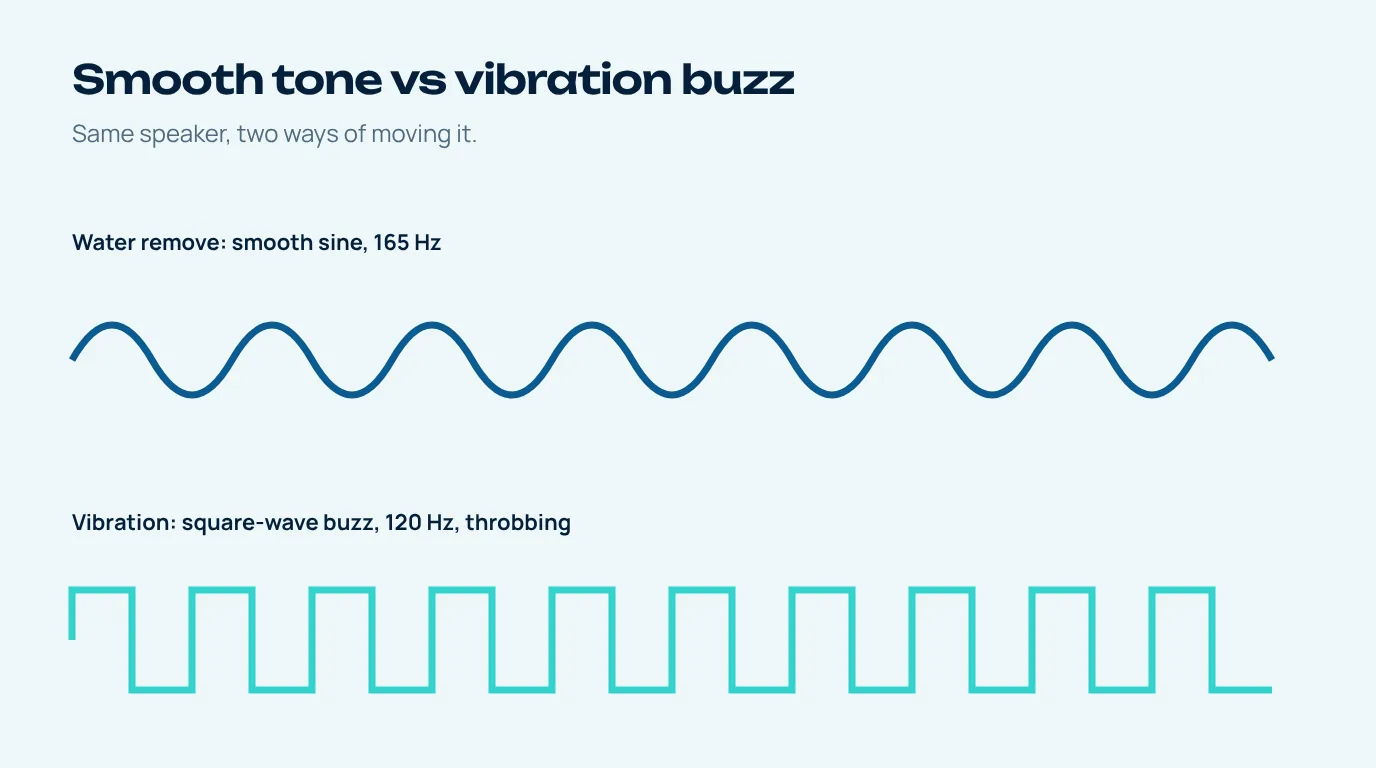
How the water vibration sound differs from the normal tone
The default pattern is a sine wave, which is about as smooth as sound gets; the diaphragm rolls back and forth in a nice even curve. The vibration pattern swaps that for a square wave, which snaps between two positions instead of gliding. Out of a little phone speaker that comes across as a rough, angry buzz with a whole bunch of higher tones mixed in.
And on top of that the buzz swells and fades about nine times a second. So the speaker's getting two kinds of movement at once, a fast 120 Hz shake and a slower throb underneath it. A droplet that's managed to settle into rhythm with a smooth tone can get knocked loose by that lumpier push.
| Water remove (default) | Vibration | |
|---|---|---|
| Wave shape | Smooth sine | Square (buzzy) |
| Pitch | 160 to 170 Hz | 120 Hz |
| Rhythm | On/off bursts | Constant buzz, throbbing about 9 times a second |
| Sounds like | Deep hum | Angry bee |
| Best for | First run on any wet speaker | Rattles and fizz left after the first run |
When to use the water vibration sound
I'd keep this as your second option rather than your first. The default tone is gentler and sorts out most wet speakers on its own. Switch to the buzz if, after that first run, you notice a fizzing or crackling on the bass notes, a rattle that comes and goes as you tilt the phone (which is often a droplet rolling around inside the speaker chamber), or the speaker's better but still sounds a bit "wet" next to how it normally does.
Give it thirty seconds to a minute with the speaker pointing down and then test again. Fizz gone? Great, back to normal life. Better but not quite there? Leave the phone to air dry for half an hour and do one more run, rather than looping it over and over.
Is a buzzing water vibration sound hard on the speaker?
It sounds a lot more aggressive than the hum, so it's a fair thing to wonder. The tool actually plays the vibration pattern at a lower level than the default tone, and everything runs through a limiter so it can't clip. It never goes louder than your phone already lets music or a speakerphone call go, either, so short runs are fine.
What I wouldn't do is leave any test tone looping for ages, especially through a speaker that's already making unhappy noises. If the rattle's still there after a couple of runs and some drying time, it may be physical damage rather than water.
Water vibration and the phone's vibration motor
So does putting the phone on vibrate, or using one of those vibration apps, do the same thing? A little, because any movement can help loosen a drop. But the motor is basically a small weight spinning or sliding inside the body of the phone, and its energy spreads out through everything. The speaker sound is way more targeted. The shaking starts right at the diaphragm, a few millimetres behind the grille where the water's actually sitting.
Best combo, honestly: play the sound with the speaker down, then give the phone a few gentle taps against your hand. Apple suggests those taps for a wet iPhone, with the connector facing down (Apple Support).
After the vibration: dry and test
Once it sounds normal again, leave the phone somewhere with a bit of airflow so whatever's in the port and the microphone holes can evaporate, and keep the charging cable out until it's dry. Then pop over to the water sound test to play each speaker on its own and sweep through the pitches. A clean sweep with no buzz anywhere is a pretty good sign you're back to normal.
Questions people ask
What is a water vibration sound?
It's a buzzy low tone that makes the phone speaker shake unevenly. Here it's a 120 Hz square wave throbbing about nine times a second, which helps knock loose the droplets a smooth tone left behind.
Should I use vibration or the normal water eject tone first?
Start with the normal tone. It's gentler and fixes most wet speakers. Try the vibration pattern if a rattle or fizz is still there afterwards.
Does phone vibration mode get water out?
Only a little. The vibration motor shakes the whole phone, while a speaker sound moves the speaker diaphragm right behind the water, which works much better.
How long should I play the vibration sound?
Thirty seconds to a minute per run is plenty. If the buzz gets better but doesn't go away, let the phone air dry for a while and try again rather than looping it.
Why does my speaker fizz after getting wet?
Fizzing usually means a little water is touching the speaker diaphragm or sitting in the chamber behind the grille. It normally fades as the water gets pushed out or evaporates.